
Download Yamo Draw – baby coloring game, children's drawing app, creative coloring tool, free kids art app, educational drawing game, fun coloring app for kids, artistic expression for toddlers
Overview
Yamo Draw is a dedicated children’s drawing application designed for iPhone, offering a safe and engaging platform for young users to explore artistic expression. The software functions as an educational drawing game that encourages creativity, hand-eye coordination, and color recognition in toddlers and preschoolers. It is tailored for children of all ages, particularly those learning to draw and experiment with colors.
The app provides a simplified interface with playful visuals, including cute animals, dolls, and fairy tale characters, to inspire imaginative play. Designed with a focus on child-friendly usability, Yamo Draw eliminates distractions such as third-party advertisements, ensuring uninterrupted creative time. The developer, 晓春 杜, has emphasized a respectful approach to children’s natural curiosity and learning process, turning the act of drawing into an enjoyable, game-like experience.
Real-world usage scenarios include at-home creative activities, classroom art sessions, and quiet time entertainment. The app supports the development of fine motor skills and early artistic confidence through interactive drawing tools and structured templates. While the developer did not provide additional details about the app’s background or broader product line, the focus remains firmly on delivering a secure, intuitive, and fun environment for young artists.
Key Features & Capabilities
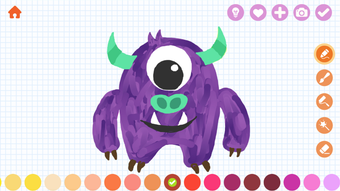
- 13 Unique Brushes – Offers a variety of drawing tools with different textures and thicknesses, allowing children to experiment with line styles and create diverse visual effects.
- 36 Solid Colors – Provides a broad palette of vibrant, non-fading colors that are easy for small hands to select and apply.
- 20 Gradient Colors – Enables smooth transitions between shades, helping children learn about color blending and depth in their artwork.
- 40+ Cute Stickers – Includes playful decorative elements that can be placed on drawings to enhance creativity and storytelling.
- 150+ Stick Figure Templates – Offers reference images of simple figures to guide children in drawing people, animals, and characters with confidence.
- Work Saving & Exporting – Allows children to save their completed artworks locally and share them with family or teachers through supported channels.
- Ad-Free Experience – The app is completely free of third-party advertisements, ensuring a distraction-free environment for young users.
- Simple, Intuitive Controls – Designed for small fingers and limited motor skills, the interface enables effortless navigation and tool selection.
These features collectively support the development of artistic confidence and creative thinking. For example, a child can use a stick figure template as a base, then apply gradient colors to create a rainbow-colored character, adding stickers for accessories. The ability to save and export work encourages a sense of accomplishment and ownership over their creations. The app’s structure makes it ideal for use during quiet time, travel, or as part of early childhood education activities. All features are aligned with the goal of making drawing accessible and enjoyable for young learners.
User Interface, Workflow & Performance
The user interface of Yamo Draw is designed with a child-centric approach, featuring large, clearly labeled icons, soft pastel colors, and playful animations. Navigation is straightforward, with a bottom toolbar providing quick access to brushes, colors, stickers, and templates. The workflow is linear and intuitive: users select a tool, choose a color or sticker, and begin drawing on a clean canvas.
The app responds promptly to touch inputs, with minimal lag, ensuring a smooth drawing experience. The developer did not specify resource usage details, but based on general behavior of similar iOS applications, the app is expected to operate efficiently within standard device memory and processing limits. Stability appears to be a priority, as the app does not include in-app purchases or ads that could disrupt performance.
The interface remains consistent across all screens, reducing cognitive load for young users. No reports of crashes or freezes were mentioned. The app’s performance is likely optimized for iPhone devices, though exact CPU or RAM behavior was not provided.
Overall, the workflow supports independent use by children, with minimal adult supervision required. The emphasis on simplicity and safety enhances the user experience for both kids and parents.
Compatibility & System Requirements
Yamo Draw is specifically designed for iPhone devices and is compatible with the latest iOS versions as of its release. The app has a file size of 100 MB, indicating a lightweight installation that does not consume excessive storage space. The developer did not specify minimum hardware requirements or supported iPhone models beyond the platform.
Compatibility information was partially provided, with no mention of iPad or other Apple devices. The app is available for download on the Apple App Store, and installation requires a valid Apple ID. The software version is listed as 1.0, suggesting it is the initial release.
No system requirements were detailed regarding processor speed, RAM, or storage capacity. The developer did not provide information about background processes or battery usage. Users should ensure their device meets the general requirements for running iOS applications.
The app’s lightweight size and focus on basic functionality suggest it will run smoothly on most current iPhone models.
Pros and Cons
Pros
- Free to download and use with no ads or in-app purchases
- Designed specifically for children with a safe, distraction-free interface
- Offers a wide variety of creative tools including brushes, colors, and stickers
- Includes over 150 reference templates to guide young artists
- Supports saving and exporting artwork for sharing and archiving
- Simple and intuitive navigation suitable for toddlers and preschoolers
- Focuses on educational value through creative expression and skill development
Cons
- No information provided about cross-device compatibility or cloud sync
- Exact performance metrics and resource usage were not disclosed
- Only available on iPhone, limiting access to other Apple devices
- Version 1.0 may lack advanced features found in mature apps
- No indication of future updates or developer roadmap
FAQ Section
Is Yamo Draw available for iPad or Mac?
As of now, the app is only available for iPhone. The developer did not indicate support for iPad or Mac devices.
Is the app safe for children to use?
Yes, Yamo Draw is designed with children in mind and does not contain third-party advertisements or in-app purchases, ensuring a safe and secure environment.
Can I update the app after downloading?
Yes, updates are available through the Apple App Store. Users can enable automatic updates or manually check for new versions.
Is Yamo Draw a free app?
Yes, the app is completely free to download and use. There are no hidden fees or premium features.
Does Yamo Draw require an internet connection?
While the app functions offline for drawing and saving, an internet connection may be needed to download updates or access future features.
Final Thoughts
Yamo Draw stands out as a thoughtful and child-focused drawing application that successfully blends fun and learning. Its ad-free environment, intuitive interface, and rich set of creative tools make it an excellent choice for parents and educators seeking a safe platform for young artists. The inclusion of templates, stickers, and multiple color options encourages exploration and builds confidence in early artistic expression.
While the app is currently limited to iPhone and lacks detailed technical specifications, its core design principles prioritize usability, safety, and enjoyment. The developer’s openness to feedback suggests a commitment to continuous improvement. For families looking for a reliable, free, and engaging creative tool for toddlers and young children, Yamo Draw delivers on its promise.
It is a rare example of a children’s app that respects the user’s developmental stage and fosters genuine creativity. Download Yamo Draw now.







